In this blog, we will cover how you can use ChatGPT to Create Games. We demonstrate how this can work. Furthermore, we will discuss how to create games on Pikoo. We will compare the options to determine which is better for each purpose.
Making games with ChatGPT:
ChatGPT is getting better and better at its job. And its role is essentially everything. Search. Write. Plan. Generate Images. Generate code. And even generate games.
We tried to make games with ChatGPT so that you don’t have to.
Prompt:
Make a snake game.
ChatGPT:
Here’s a complete, clean Snake Game you can run instantly in the browser.
It’s pure HTML + CSS + JavaScript, works on desktop & mobile, and is easy to extend (levels, skins, sounds).
🐍 Snake Game (Classic)
Controls
- Desktop: Arrow Keys
- Mobile: Swipe
Rules
- Eat food → snake grows
- Hit the wall or yourself → game over
Things to note here:
- ChatGPT generates a game code file with a single prompt. No clarifications were asked. No checking on the details on your idea. Nothing. Just eager to please ChatBot spitting out the first possible thing that comes to mind.
- It gave you the code but NOT the ability to run it. So you still need something like VS Code to create the correct index.html file.
- In the spirit of keeping it as standard as a non-coder would, I went ahead and posted the code on the W3Schools website to see how the game works.
- The game did NOT work.
I went back to the GPT and told them the game is NOT working. And this time again. It gave me a new piece of code. However, it worked this time. There are still many more problems with the game, but I cannot customize things.
Making a game on Pikoo
Trying the same prompt on Pikoo.
Prompt:
Make a snake game.
Pikoo:
Awesome choice! The classic Snake game is a fun project to work on. Let’s break it down:
YOUR GAME DESIGN
What you’ll make: A simple Snake game where you control a snake to collect food and grow longer without crashing into itself or the walls.
The Setup:
You control: A snake
Goal: Eat as much food as possible to grow your snake
Watch out for: Crashing into walls or yourself ends the game
Controls: Arrow keys to change direction (Up, Down, Left, Right)
Tech choice: Vanilla JS with Canvas
Why: It keeps everything simple and perfect for 2D games like Snake!
HERE’S YOUR GAME!
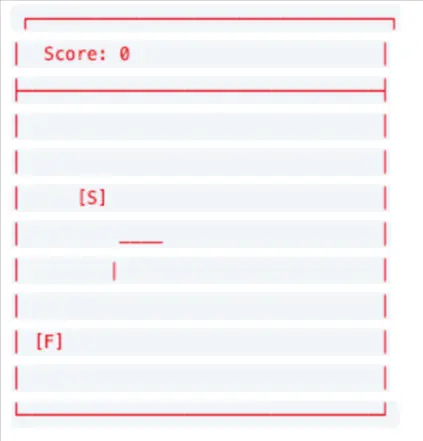
Legend:
[S] = Snake Head
[F] = Food
Controls: Use arrow keys to move your snake and eat the food.
Goal: Eat the food to grow longer, but don’t crash into yourself or the walls!
Does this look right? Just say ‘yes’ or ‘looks good’, and I’ll build it! Or tell me what to change.
Prompt:
Looks good.
And we got the game.
Things to note here:
1. Pikoo did NOT jump into making the game. It came back asking for more information. Stated the
- Goal
- What to watch out for
- Controls
- Tech choice
- Explanation for tech choice
- Game visualized with simple design
This helps understand what we’re trying to accomplish and then get a fair bit of details on the outcome before it happens. At this stage, I have not had to do any extra efforts to understand my game and I can change the game’s layout and details in it.
However, since I liked what I saw here, I went ahead and told it “Looks good”
2. The game is created, deployed and playable right in my chat window or in a new tab. No need for a code editor program on my computer. No need to go on another website like w3schools to go and test it out.
3. It works in the first go and it has somewhat better graphic choices.
Furthermore, I told Pikoo that this looks boring and suggested making it prettier. And look what it did:
Here are some of the key differences between ChatGPT and Pikoo. If you’re interested in general things or doing research or looking to solve a specific query, go for ChatGPT. But if you’re trying to build a game… Pikoo is the right place for you. Pikoo will continue to understand your requirements and keep improving your game. We’re upgrading Pikoo to be the ultimate AI game creator. Stay updated. Try it soon.
Leave a Reply